Tuesday, April 19, 2011

Bodhrán & Stained Glass

Two new shots on Flickr

Bodhrán & Whistle

I decided to end my photography drought this weekend with a few shots and events. Got two amazing results. First the above shot: My favorite musical instrument couple. The second after the jump.

Sunday, March 20, 2011

The Start of Precision

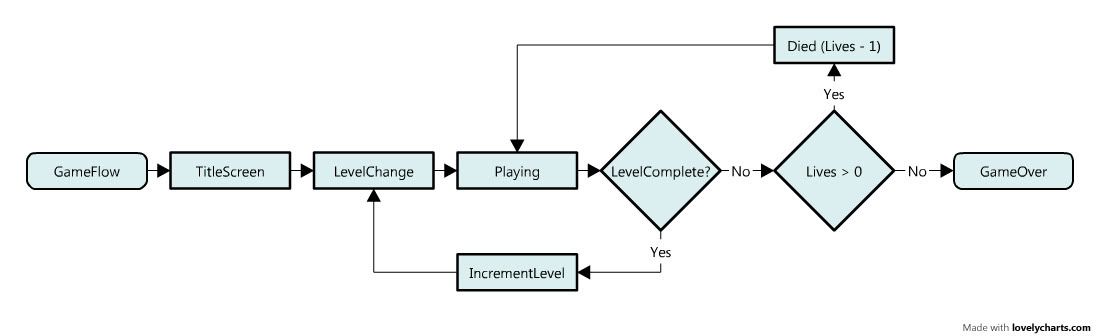
And the Flow of "Level & Lives" -Based Games


Made with LovelyCharts.com

5 days ago I posted my favorite IDE color scheme. If you read between the lines, that means I was sitting back down to my coding chair. Small note: thank you for the 100 download in 5 days of my Putty Base color scheme for Visual Studio.

I have started the final project of 3DBuzz's XNA Xtreme 101 volume 2: Precision.

With the start of this project, a game-flow discussion that turned out to be the standard game-flow of level- and lives-based games. I decided to chart it out. "Game Over" state can do a lot of things. You can go back to title, you can have a special "restart/continue/credit" scenario... that is pretty much up to you. The basic is the same all around.

Wednesday, March 16, 2011

What Makes a Good IDE Color Scheme


Last night I posted what is my all-time favorite color scheme. It then occurred to me that not everyone knows what to look for in a color scheme. It’s mostly a matter of taste, but there are essentials.

Tuesday, March 15, 2011

Putty your IDE


If you’re a developer or programmer and have spent considerable time reading and writing code, you know how important it is to have a good color scheme in your IDE that’s easy to read and easy for your eyes.

There are a lot of different color schemes for different IDE’s. I’ve looked on-and-off for years. I stuck to Ruby Blue on different IDE’s for quite some time. I recently stumbled on one and have ported it to different IDE’s... Putty!

Tuesday, February 8, 2011

Encountering the Whitespace Incident

Last week, I encountered an interesting issue while coding something at work.

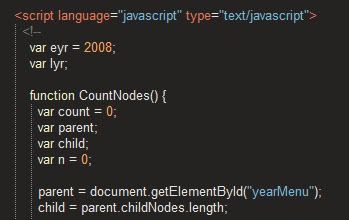
Essentially, there's some JavaScript hard-coded on one page that's triggered with the page content handled with the CMS. What that piece of code does is essentially running through an inline list of years and changing the CSS code of the links inside the list items (and tables below) depending on what was done using a for loop (from start_year to end_year). You can see this here.

Originally, the start and end values for the loop were hard-coded as constants. This worked well until I had to add 2011 to the list. The list is part of the page content, which can be modified with the CMS, but the JavaScript is not. Changing the constant every year is simply not practical.

I decided to make the JavaScript smarter.